Well, just like everyone else, I am wrapping up my work for this semester. For IS449W, I found this to be my most enjoyable class this semester and one of my favorite classes taken in the past five and half years at Eastern. It sure would be nice if the department could apply a few more courses like this to the curriculum. The amount of hands on work programming, using different languages, incorporating different services etc. was really rewarding and challenging. I envision a network class where you actually have to configure a network with your classmates, a database class that actually functions on a server and has a web front-end, and a security class where we develop networks/programs and learn different techniques to expose their weaknesses. It would just be really nice to have some of our other courses modeled off of this one. I think we all learned a lot based on the methodologies used.
Another nice thing about this class were the other students involved. We all apparently learned a thing or two on our way to this class and it shows in everyones work. I was really impressed with both the group projects and individual projects. Some were entertaining (Justin), others were really helpful (Matt), some made me thirsty (James) and some looked really sweet and made me jealous (Mountain Biking Group). Nice work everyone, it's been a pleasure taking classes with you over the past few years. If you want to stay connected, find me on LinkedIn.
Thanks to Matt, I also noticed some people are running kinda low on blog posts. Here's some ideas if you are lacking in creativity today:
There happens to be a developer tool built into Google Chrome that helps you debug your javascript, manipulate the DOM, and check the performance of a webpage. Of course at this point, most of us are wrapping up our work on our projects, so the discovery of this tool might not help anybody immediately in this class, but some of the features could help you down the road.
The Google Chrome Developer Tool functions a lot like Firebug does for Firefox. With this tool you can breakdown the code of a webpage, manipulate html, css, and javascript codes, and test the speed/latency of your code. Below you can find a video showcasing how to use the developer tool to manipulate your code.
My favorite feature of the devtool is that you can check the speed of your application. They call this feature "Profiling and Optimizing". It allows you to record a page as it loads and then tells you which part of the code is using the most resources or taking the longest. If your code is taking a long time to load, you can use this tool to troubleshoot the problem. You can also create stops in your javascript code to troubleshoot problems as well. Essentially, it functions just like putting an alert box in your code. The benefit of this tool is that you don't have to keep uploading new iterations to the server. You can perform all of your testing without touching your real code, thus saving you from having to rework a page after over-testing it. The video below demonstrates this functionality.
After a bit of use, I like the Chrome Developer Tool more then Firebug. It is easier to work with then Firebug and I find it runs lighter and faster then Firebug too. I think it would be a very useful tool for us to use in our presentations of our projects, since we can display the functionality of the site as well as the underlying code without any hassle. Anybody else agree?
Last night I wrapped up my work on my individual project. While I am happy that it is finished, I am disappointed that I could not get my site functioning as I originally planned. As a refresher, my site is for a tree care company and I was designing an application for users to submit a bid request. As it stands now, I pull data from the Weather Underground API and Google Calendar RSS feed and display it. The page automatically displays todays weather and the most recent event on the calendar. This would be the first thing that I would change if I had more time to work on the project. I would use a javascript calendar to dynamically display a calendar to my user so they can pick a specific date they wanted to have a bid on.
Another shortcoming for my application is how the data is displayed. I was hoping to throw the results from my API's into a equation that would display an image showing the likelihood that the bid would happen on the requested day. For example, if the calendar showed 9 appointments and the weather was forecasted as rainy, the application would return a sad face and tell the user to select another day. If it was going to be sunny and there were only 3 appointments for that day, the program would return a happy face.
Finally, I am also unhappy with the functionality of the calendar as I have implemented it. Right now I am iterating over the RSS feed from the calendar. What I needed to do was use the GCal data API to be able to download and upload data to the calendar. This requires the use of authentication which didn't appeal to me for usage by customers that wouldn't have access to the calendar.
Part of why I settled with my project as it is now is because the owner of the tree service company, a.k.a. my father, showed a lack of interest in the application. To him, he didn't like the idea of customers telling him when to do a bid. He would much prefer them send him an email telling them what they were interested in and then he would set the final date for the bid. I'll have to rethink this system to better match his business needs before spending a lot of time developing an application that would never be used!
When I read the story of Wired writer Evan Ratliff's attempt to alter his identity and hide away for a month, I was shocked at how much information his pursuant's were able to conjure up. For those of you unfamiliar with the story, Wired challenged writer Evan Ratliff to change his identity and offered a $5,000 reward for anyone that could find him, take his picture, and say the secret code "fluke". The magazines editor would place a crumb trail online of information that a detective would be able to dig up on a person i.e. bank accounts, credit transactions, social media accounts, and phone records. From this the pursuant's would try to piece together his new identity and whereabouts.
The crazy stuff people eventually tracked down about him online included: all of his previous addresses in the U.S., detailed information about his entire family, his childhood nicknames, his cats names, his favorite mechanic and authors, that he had celiac disease, his signature on a deed to his apartment in New York, and his purchasing habits. In fact a lot of this information is posted about all of us all over the web. Don't believe me? Google your name and see what comes up. For those of you that are unlucky like me and have a uncommon name, you're a pretty easy target. Sites such as www.123people.com and www.isthisyour.name scour the internet collecting information about whomever they can find. I'm sure i'll be getting Google Alerts for this blog posting in a matter of months. They are still showing up for my blog posts in Bud Gibson's (link is cached by Google) class a few years ago...
Getting back to Ratliffs story, it didn't take long for a devoted group to set out to track Ratliff down. One individual setup a web-forum where other searchers could share clues and ideas. A twitter tag was created and trackers could tweet their latest trails and data. Another person created a facebook application to try to track down Ratliff. Smart enough to know that he could use this to his advantage, Ratliff frequented the sites to see if anyone was hot on his trail or off following the diversions he created. He had a close call in Atlanta where, upon landing at the airport, he checked the twitter account and realized people where already there looking for him. Eventually his traffic to these sites would be his demise. The facebook application logged users IP addresses and the developer eventually tied Ratliff and his false identity attached to the IP address.
So did Ratliff manage to vanish in a digital age? I recommend reading the article to find out exactly what happened to him. What I will say is that it would be interesting to see what the results would be if someone kept a lower profile then he did (which was already pretty low). He did a good job avoiding traceable transactions by using cash and Visa gift cards as credit cards. But you can only last so long on cash alone. Another issue he had was the use of I.D. To really succeed at disappearing, you would need to find a way to totally create a new identity complete with new I.D.'s or just move to some remote place in the mountains.
While I really like Matt's blog counting site, I decided it was too tedious to have to jump to an additional page and do all that searching and stuff. I appreciate his hard work and he most certainly displayed his skills learned in the class, but I figured there was an easier way to count your blogs.
All you need to do is put a unique keyword on each of your posts. My unique word is 'Colin'. Now that the keyword is added to the tag cloud, it will automatically count my posts for me. As you can see in the image, I have posted 10 blogs prior to this post. How simple! Sadly this method will not work for comments, and for that case I will have to resort to Matt's blog and comment counting site.
Note: PLEASE don't add my name to your keywords on your posts. You will ruin my plan and it would be very rude!
In the GoogleLab API, there are several awesome examples of apps you can build using Gears. For those of you that don't know what Google Gears is, heres a brief history. Google experimented with offline applications and came to a few conclusions. As they developed offline-enabled applications, they typically found the following design flaws:
isolating the data layer
deciding which features to implement offline (connection strategy)
deciding on the app's modality
implementing data synchronization
What an offline application can do is allow a user to interact with a web-service and to be productive while a connection is unavailable. Gears localizes several server features to give the user as rich of an experience as possible. Items that are localized on the client side include a data switch, server data layer, local data later, database, and a sync engine. While that may seem like a lot of stress to put on the client side, they have modules included that lighten the work load and only marginally decrease the speed of the application. When a connection is made with a server, Gears uses either Ajax or Comet to transfer data.
So back to these cool applications. The one I read into was called Runningman. Runningman is a program designed for the Android OS that allows a runner to time their run and through the use of the phones GPS, track their path on a Google Map. The group working on the mountian biking website might benefit from this example, since they are doing something very similar.
The Runningman application includes Gears and contains a full code sample that you can download and manipulate on your own. They even have a full tutorial telling you have to write the program. Way cool! As you walk through the tutorial, they show you how Gears lets you create a desktop shortcut, use Comet to update data, use the Gears Localsever to operate offline, and much more.
This class is all about programming with Ajax. But Ajax isn't a programming language at all, its simply a methodology to connect asynchronously to a server using Javascript. Ajax isn't the only way to gain this functionality though. Ajax works by polling data from a server, but what if you wanted the server to push data to the browser? Thats where Comet comes in.
As you can see from the above image, Ajax relies on a request sent from the browser to the server. All of the arrows point from the browser to the server. In the Comet example, the arrows originate from the server and send data to the browser. There are two types of comet: streaming and long polling. Long Polling simply uses a regular Ajax request that remains open. Streaming uses one of two methods, Hidden IFrame or XMLHttpRequest Server Push. According to webreference.com, Long Polling is the way to go because it is so similar to Ajax and browsers/servers alike are commonly compatible with it.
A great how-to tutorial can be found at webreference.com. You will see that Comet shares a lot of similarities with Ajax. Examples of programs using Comet include Gmail Chat and several sports websites 'Live Score' apps. Btw, anyone that already knows a lot about Comet should check out the Wikipedia page for it. It has a lot of warning messages on the top! Disclaimer: None of the content for this post was found on Wikipedia.
So it turns out we have a limit on our people.emich sites. Ok so I knew this, but never really paid attention to it. Last week I received a message from the admin stating I was over quota:
Presumably this is a bad thing. After looking at the people.emich rules, you are given a 50mb limit on your personal site. Nothing bad really happens at this point, but once you reach 55mb, what they call the hard limit, your account is frozen until you delete some content. So what do you do when you reach this limit? Well check out the link they gave me in the above image, substituting my user name for yours. On the next image you see a screen shot from my site, showing the current data usage and highlighting the files that are using the most space.
What you may have noticed is that there a few images that are taking up 8.3% of my space each. Ouch. Well it turns out I didn't need these images anyway. They were the master files that I eventually cropped, resized, and then used on my page. I was able to delete these images and drop way below the qouta. Take a look at the image below and see how deleting a couple of images fixed my issue.
Previously in class I blogged about some breakthroughs in the mobile market. Since then there has been a rush of more exciting news about new phone releases and more mobile barriers coming done. This will effect all of us either as developers or simply as users of mobile devices. One interesting problem still remaining is the vast diversity of mobile platforms out there. Operating systems such as Android, Apple's iPhone, Windows Mobile 6.0, and Palm are certainly the industry leaders when it comes to mobile OS's. But even among these main players, there is still a huge diversity in devices they are loaded on. Screen resolution, screen size, touch/non-touch screen, and hardware are just a few of the differences out there that can make mobile application development a headache for us.
One option is to provide services on the web whenever possible. In a similar way that desktop applications have moved to thin mobile clients, so too can mobile applications. As mobile browser standards evolve and a major player emerges as the 'go-to-mobile-browser', I think we can expect more robust web services on our mobile devices.
The W3C has a working "Mobile Web Best Practices" page to help get these standards established. While they are certainly far from simple instructions, I think this is a good solution to look to in the future. A simpler guide to web development can be found here: A Beginner's Guide to Mobile Web Development. What is important to keep in mind is that the devices with strong enough hardware capabilities are just now starting to be realized. As the iPhones, Palm Pre's, and Androids continue to advance, expect their web capabilities to significantly increase. Speaking of Android, check out the new Droid for Verizon!! A wicked fast processor, one of the thinnest QWERTY keyboards on the market, and a "Multimedia Docking Station" feature are just a few of the highlights. I'm personally looking forward to a bluetooth-navigation application that I can sync to my car :-)
Can't figure out why your page looks like garbage? Wanna see how someone has used html and css to make a wicked awesome website? Then download the Firebug extension for Firefox.
In my latest post, I talked about using different width and padding settings to render a page (almost) perfectly on a user's screen, regardless of screen resolution. Well frankly I didn't really get much out of the descriptive material the author provided on their page. I didn't help to look at their CSS, since I had to jump back and forth from HTML to CSS to see what was being styled where.
This is where Firebug comes in. As an extension to Firefox, the program simply runs through the browser. You can use it to shift through their HTML, and Firebug will hightlight on the page which areas are using that portion of the html. It also provides you with a sidebox showing the CSS specifically provided for that portion of the HTML and it shows you what CSS it inherits. Defininetly a way cool feature! I recommend checking it out if your having any trouble styling your webpage.
Through my light experience in web design, I have been frustrated with setting my page widths. Why is it that when I design my page in the lab it looks great but when I look at it on my laptop at home it suddenly looks huge!? I have tried using several combination's of fixed and percentage widths, but nothing ever comes out looking like I want it to.
With the use of max and mix page widths, you can change the way your page is rendered based on the users browsers settings. The example I found is on the 'CSS Tricks' website. They have a page called "Perfect Fluid Width Layout" where the show a good example of a page that varies in width. Their min-width is set to 780px for those users with a low resolution screen and the max-width is set to 1260px for users with high resolution screens.
I think the real trick to their page comes with their combination of padding and width settings. With the main div box has a variable width setting, the boxes within it have a fixed width. Their spacing is determined by the padding settings. Both are then maintained while the browser changes size. I might have to practice this method more to fully understand it, but on paper it makes sense. I recommend checking out their page and use firebug to see how it works.
In case you missed it, there has been 2 pretty big developments in the mobile phone market in the last 24 hours.
1. Verizon has reached an agreement with Google to release two Android phones. Whats major about this is that the phones will also come with Google Voice, an application that AT&T has thus far banned from their iPhone's app store. Google Voice will allow users to transmit several traditional phone features over Wi-Fi instead of a typical cellular connection.
2. In response to Google's latest breakthrough, AT&T announced today that the iPhone will now support VoIP applications. (WOOOHOOOOO!!!!). What is WAY cool about this development is now you will be able to use applications to place regular calls over a Wi-Fi network. Talk about cost savings!
Whether the iPhone/AT&T is based on their pending FFC investigation or on Googles actions remains to be seen.
disclaimer: I know this post has nothing to do with class, therefore don't count it towards my writing submission please! I just want to share the news with the class! :-) Thanks
So we are working writing webpages based off of Ajax in this class, which I find way cool. But we have also discussed browser compatibilities and issues with end users using strange configurations on their computers. What happens to your Ajax if the end user has Javascript disabled? If you haven't written your code to cater to these users, chances are they won't see it. This issue can be even greater if you have decided to run a lean webpage that functions solely on Ajax . . . So what do you do?!
isAjax() will solve your problems. You can use this function to either send an Ajax version of a page if javascript is enabled, or else function will load an entirely new webpage; allowing you the user to still view the content of your webpage. Here's what it looks like:
I really like this function and think it solves a lot of problems for developers. I have had to deal with browser compatibility issues at my previous job and view functions like these as lifesavers!
So last week in class we discussed Web 2.0. I believe the technology behind Google Wave will eventually be considered Web 3.0. My information comes from a 80 minute presentation Google provided during their annual summit. If you want to watch it, I have included it at the bottom of this post. Underneath the photos for each topic you can find a time note of where in the video you can find the relevant topic. I'll highlight the important aspects of Wave and why I think it is the foundation for Web 3.0.
First of all, what Google Wave is. Source:techpp.com
Google Wave is an API that enables real time communication between two end users with technologies that on the surface seem very similar to AJAX. The web browser actively communicates with the server without having to reload the page. However, one significant difference from AJAX is that this active communication doesn't simply exist between a browser and server, the connection can be linked between several users, other web pages, and other API's. Lets take a look at a few examples:
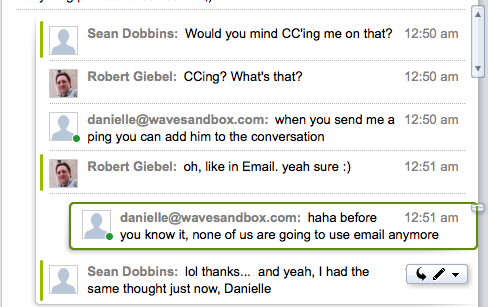
Wave merges instant messenger with email and adds some functions similar to wall posts on Facebook. For example, an email in Wave appears similar to an instant message, with both parties responses posted in chronological order. Users can also go back and comment in previous emails wherever they choose, a bit like facebook. All of this communication takes place live and you can view someone typing their message word for word. Therefore, instead of only one party typing at a time, Wave makes online communication more like real world/face-to-face communication. The image above is an example of how this communication works.
Ex 2. - Mobile Source:phandroid.com. Video: Minute 25
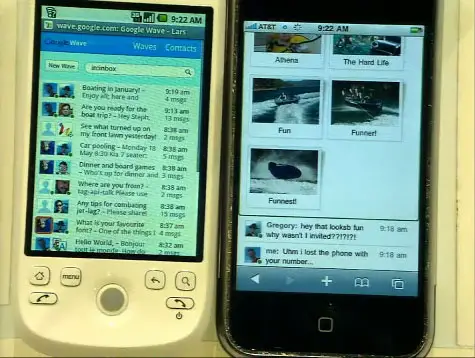
Wave incorporates this live communication with mobile phones. During their presentation, an Android and iPhone actively participated with the Wave running on a laptop computer. With Wave, mobile phones will have far more functionality then ever before. Note: The video for this would have worked much better if they had an internet connection on their phone :-)
Ex. 3 - Interacting with API's Source:mangochico.com. Video: Minute 72
Finally, one of my favorite uses of Wave is with a text translator. Google calls the API 'Rosey'. Rosey works in your live chat and actively translates your text. In the example from their presentation, a French worker communicates with an American worker while both type in their native languages. Rosey translates both users messages and neither one has to worry about switching back-and-forth between a translation site and their chat window. This feature is truly awesome and I recommend you watch the video to check it out.
The video
So what does this have to do with Web 3.0? Well Web 2.0 enabled users to collaborate with one-another and to control the content on websites. Wave takes this a level further, opening new channels of communication and enabling communication at entirely new speeds. The examples Google provides are simply what they have created through development. Their goal was to create the technology and infrastructure for Wave and have developers create the applications, yet another example built off of Web 2.0 theories. Once developers get their hands on the API's, I think we will see a real revolution in the way websites interact with their users.
Note: If you get the gist of what Wave is from this post and want to see more awesome features of Wave, fast forward to minute 49 of the youtube clip and watch the last half hour.
Embedding a video into blogger is actually quite simple. First, find your desired video on youtube. Mine is located at: www.youtube.com On your youtube page, find the embed box underneath the videos description. Caution: there is a url box above the embed box. Don't copy the url! That will simply make a link to your video and not embed it in your page.
Copy this text and then return to blogger. Create a new post and paste your embed text in the edit html tab on your post. The edit html tab is above the edit window for your post on the right hand side. You can click on compose to return to a 'rich editor' formate.
You should be all set! Here is my example below. This is from my first mountain biking race. Sadly you cannot find me in this video, as the author only tracked their friends in their video. I did make it down that hill though!


 Lab API, there are several awesome examples of apps you can build using Gears. For those of you that don't know what Google Gears is, heres a brief history. Google experimented with offline applications and came to a few conclusions. As they developed offline-enabled applications, they typically found the following design flaws: