Showing posts with label AJAX Uses. Show all posts

Mar 17, 2010

Google St. Patrick's Day

Since today is St, Patrick's Day I thought it would be fun to see what new doodle was going to be used by Google on there home page. They decided to go with a Celtic theme and used Celtic symbols to represent there logo. There was a little article that talked about this and how they usually celebrate different occasions by changing the appearance of their logo.


I also thought it would be interesting to see how many sites came up when you google St. Patick's Day. It turns out there was 19,100,000 results. Everything form news, history, images, and so much more.

This got me thinking. Many people celebrate St. Patrick's Day even if they are not Irish. This is a very old holiday with a lot of tradition and many people like to participate by drinking green beer and wearing green. This would be a great opportunity to create an AJAX application to find local Irish pubs, St. Patrick's Day events, news, and history.

Oct 7, 2009

Adobe Air


The Adobe® AIR™ runtime lets developers use proven web technologies to build rich Internet applications that run outside the browser on multiple operating systems.

Business benefits
Adobe AIR offers an exciting new way to engage customers with innovative, branded applications, without requiring changes to existing technology, people, or processes.

With the Adobe® AIR™ runtime, you can deliver branded rich Internet applications outside the browser that give you a closer connection to your customer.
Adobe AIR uses the same proven, cost-effective technologies used to build web applications, so development and deployment is rapid and low risk. You can use your existing web development resources to create engaging, branded applications that run on all major desktop operating systems.
The benefits are extensive. By using Adobe AIR as part of your RIA strategy, you can boost productivity, extend your market reach, enhance customer satisfaction, improve customer retention, lower costs, and increase profits.
Business benefits
Companies like eBay, AOL, and NASDAQ are already using Adobe AIR to deliver engaging RIAs to their users' desktops. With Adobe AIR, you can:
Establish a more persistent connection with existing customers
Deliver fully branded experiences with desktop functionality
Leverage existing personnel, processes, and infrastructure
Develop and deliver RIAs efficiently using proven Adobe technology
Increase the ROI of your web investments

Commercial considerations
Adobe offers its own commercial development tools for Flex-based AIR development. Adobe's Flex IDE, which we tested briefly, is built on top of the open-source Eclipse IDE and includes robust support for drag-and-drop visual Flex application design. AIR development tools have also been incorporated into Dreamweaver CS3. Adobe has fortunately made its own tools entirely optional, so AIR developers don't have to worry about getting locked into expensive commercial design software.


AIR support is already being integrated into third-party commercial development tools such as Aptana Studio. AIR developers can also use a conventional text editor in conjunction with Adobe's free command-line tools. Flex and AIR development can be done entirely with standard text editors; in fact, most of the programs we created during our tests were written in Vim on Ubuntu Linux and then compiled and tested on Windows in VMware.

Before we get into the nitty-gritty of Adobe AIR, it helps to understand a few key terms and break down what it means to be a "cross-operating system runtime" that can run desktop applications.
AIR is, first of all, a runtime engine at its most basic. A runtime engine is simply computer software that other applications need to use in order to run properly; it translates language within a program into machine language, the simple, lowest level language (essentially 0s and 1s) the central processing unit (CPU) can understand. Programs that run on Java, for example, require the Java Virtual Machine runtime engine installed on the computer. Without it, your computer wouldn't be able to make use of the same graphical user interface (GUI) that you're used to using now. A GUI, also known as a human-computer interface, is the combination of windows, icons, text and menus that we can change with a mouse or a keyboard. Even your operating system can be considered the mother of all runtime engines, since every application on your computer depends on the processes of the operating system.
So when Adobe describes AIR as a "cross-operating system runtime," they just mean that AIR is a runtime that can work on any computer, regardless of the operating system. Different operating systems use different languages; a program running on Mac OSX, for instance, won't look the same as the same program running on Windows XP. Applications built with Adobe programs such as Flash or Flex will use the AIR runtime to display -- because AIR comes the with the open-source WebKit HTML renderer, Web-like content can display on the desktop. That's the big difference between something like a Flash player and AIR: While Flash works over the Internet and in your Web browser, applications running off of AIR are based on the desktop and don't necessarily require a browser to work.


Sep 9, 2009

Some uses of AJAX

What is AJAX? AJAX, which stands for Asynchronous JavaScript and XML, is a programming technology that allows for a webpage to retreive data from a server without refreshing the whole page. This makes it nice when you have large graphics on the page, and it takes a lot of bandwidth not to mention your time when you click the the dreaded refresh button.


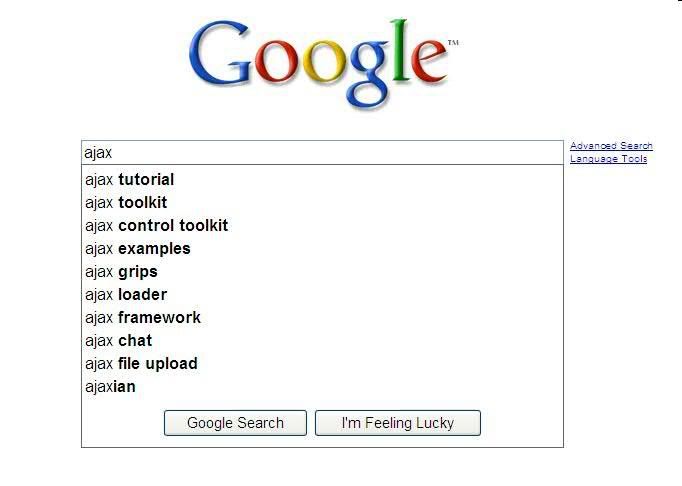
One use of AJAX that everyone probably uses everyday is the search bar on Googles homepage. As the picture below shows once you start typing in the search bar, Ajax provides for the a box to drop down and provide you with search suggestions based on what you type. This nifty tool has helped me out several times when trying to provide a good search string for the topic I am searching out.


Another use of AJAX is in the form of an API (application programming interface) that you can embed into your own website. I found a cool video on Youtube that shows the use of an API embedded into a webpage. The search block API which is shown in the video was developed by google and provides a way for google search to provide results of the search in a box located on the webpage without actually refreshing the whole webpage. To test out the AJAX search block for yourself you can visit the http://playpen.moodle.com.au/moodle/course/view.php?id=11 and start typing in the google search located in the bottom right hand corner.