Showing posts with label API's. Show all posts

Apr 20, 2010

API Documentation


One of the main issues this semester was the lack of available for each individual API that many of us attempted to use. Google has set up discussion groups and blogs that will assist you in the development of a workable API, but even then there are many situations that are not easily worked around or understood.

An example of this struggle would be with the attempted use of the C-Net API. There were so many variations of it [Java Script, PHP, etc] that I believe the developers lost the simplicity that API's are supposed to achieve. There really should not be a reason why implementation of this sort should be difficult, but it remains so.

Even if there is documentation for an API, many of them have usage limits that are simply unreasonable. I have seen examples where there was only an allowance of three requests per hour - just testing the API would have put you over the limit. Many of the methodologies are created by people who quickly put something together, rather than those who were actually trying to make life a little easier. Worst of all, it is extremely difficult to read and understand code that was not developed yourself.

All things being equal, finding documentation turned out to be a project in and of itself. I hope everyone had a good time creating their projects.

Apr 16, 2010

Group Iteration 3

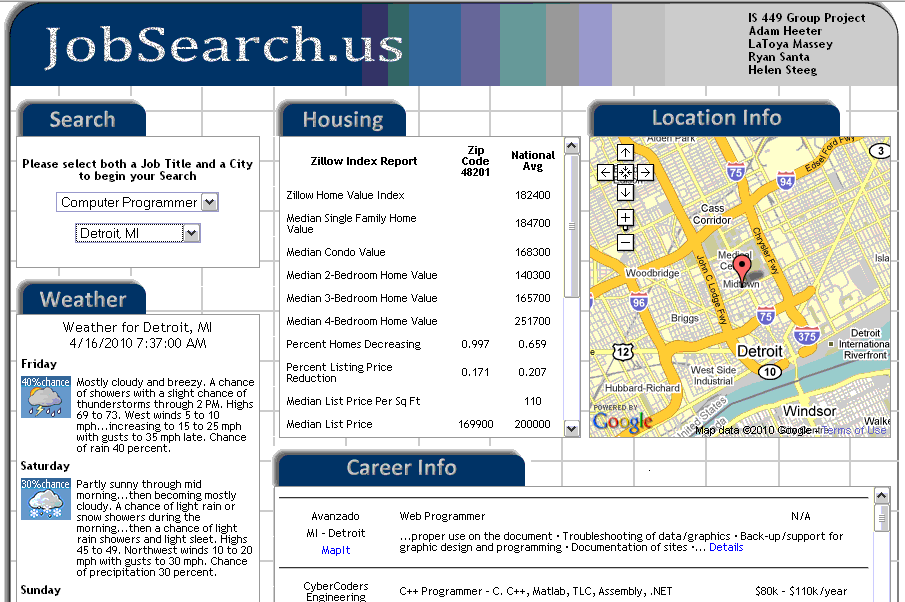
Although things didn't go so well for my individual iteration3, the group site turned out great. Adam really went above and beyond with this project. Of course he has a lot of prior knowledge and experience. Here is what our site looks like:


Our site uses several API's to create a place for users to find jobs by location, get detailed information for a career, see housing and weather information for that location, and view the location and career on the map. Our group has completed all of the requirements for iteration 3 and maybe a little more. The site is better than our original ideas.

I am very happy that we completed our iteration and how everyone worked well together. As we have seen in this class, all of the groups came up with great ideas for their projects. I look forward to finding other ways to use API's and create different sites.

Mar 17, 2010

Chronicling America API

For my individual iteration 2 I am am using the Chronicling America API. This API gives information about historic newspapers and select digitized newspaper pages. It is produced by the National Digital Newspaper Program (NDNP), a partnership between the National Endowment for the Humanities (NEH) and the Library of Congress (LC).

The site allows you to search and view newspaper pages from 1880-1922 and find information about American newspapers published between 1690-present. To encourage a wide range of potential uses, they designed several different views of the data which are publicly visible and do not require an API key to use them.

This API allows you to:
  • Search - the newspaper directory and digitized page contents using OpenSearch.
  • Link - using stable URL pattern for titles, issues, editions, and pages.
  • Linked Data - views of information about titles, batches, issues, and pages in RDF/XML.
  • Aggregations - of items, like all the pages that make one issue, are related using OAI-ORE
Compared to the old methods of looking up newspaper pages, this is a convinient way to view historic data. Here is an example of a newspaper page:

Mar 9, 2010

Experimental APIs Extensions for Chrome

A little over a month ago Google announced that their browser, Chrome, would not be able have extensions added to it. Extensions add to the functionality of a browser and allow the user to kind of customize their browser to their needs. Well last week a Google software engineer announced that there are a couple of experimental extension APIs that are being tested.

The first is a history API that allows developers to modify the user's browsing history. When the API is complete, develops will be able to replace the user's history with their own. The second API is more of a processes API. This API gives third party developers access to Chrome's process model, such as information on the CPU usage for each tab.

To me this sounds like it could be a security risk to home users but I know that Google does monitor extensions that attempt to access files from your computer. These APIs are available now in Google's Dev Channel and they encourage people to play with them a bit and then give some feedback.

Post can be found here at The Chromium Blog

Mar 5, 2010

FixWire News API

So one of the other services that we wanted to provide on our group project was a local news service so I picked the FixWire API to do this. Documentation for the AP can be found Here. This API requires two steps. First you will need to find the Geo (as FixWire calls it) which is a location ID for all of the locations throughout the us. The URL for doing this is:

http://api.fwix.com/general/geos.xml

This provides the following output:


Once you have this output you can get the geoId for the locations that you want to search. From there you will need to provide three things for the search. The GeoID, a latitude and a longitude. You then form this into a url which will look like the following:

http://api.fwix.com/fetch/nearby.xml?geo_id=117&lat=34.2257255&lon=-77.9447102&radius=3

You will get an output that looks something like this:


I then took this data and parsed it using SimpleXML and Xpath methods to extract the stories and the data that I needed. I did it using a series of for loops and then formatted it using HTML in the PHP script before it was sent back to the Javascript. Here is the code:


What I did here was to create a function that grabbed only the first 250 characters of a story and then I checked to see if the XML had a image tag. If it did then I printed different HTML that included the image. Then I just went to a for loop to print out all the stories with their title, summary, and source, as well as the picture if it had one. Here is the final output.

Zillow Real Estate API

For our group project we wanted to provide some housing statistics for people who were looking to relocate.The API that we chose to do this was the Zillow API which is a real estate API that allows you to do all kinds of searches for housing information in different areas. The types of info I was looking for was median home prices as well as other pertinent info. I used the following URL to get the data:

$zip = $_REQUEST['zipID'];
$url = 'http://www.zillow.com/webservice/GetDemographics.htm?zws-id=X1-ZWz1c2hu5r9fd7_5f91a&zip=';
$fullUrl = $url.$zip;

This basically provides a XML output that I used to grab the data. Below is the output from the query.


Once I had the data I then grabbed the Zip code returned as well as all of the attribute tags and its child tags. I did this withe the following code.

$zip = $xml->xpath('/Demographics:demographics/response/region/zip/text()');

$attr = $xml->xpath('//attribute');

Once I had all of the attribute tags into the array I was able to access them by using a for loop in order to iterate through all of them and return them back to the Javascript code and finally to the users browser.

for($i=0; $i<10;>name
echo $attr[$i]->values->zip->value[0]
echo $attr[$i]->values->nation->value[0]
}

You can see that the Xpath methods use a object type of structure to access the child nodes. The -> denotes a child node and once you know the path you can traverse all of the tags. For instance the query echo $attr[$i]->values->zip->value[0] is used to access the following data:


Once you have grabbed all of the data you can simply use a series of echos from the PHP script to send the data to the Javascript in a nicely formated string.


Anyway, the final output looks like this. I is not to fancy but it provides the data necessary.

7 Day Forcast WeatherBug

For my individual project I used a simple current conditions search to retrieve the current conditions for an area. However, for our group project I wanted to provide a 5 or 7 day forcast. While this wasn't much different for getting the data, parsing through the results was much different as I had to create loops to search through the iterations. See my previous posts to see the code behind in order to return the data but for this post I'm going to show you how to search through the data and parse the XML. First I used the following URL to get the data.

http://A6357896562.api.wxbug.net/getForecastRSS.aspx?ACode=A6357896562&OutputType=1&zipCode=48189.

This returns the following data:


After I get the data it is time for parsing. I use the SimpleXML Xpath function to get the data into a searchable variable.

$xml = new SimpleXMLElement($data);

Then I simply create a for loop to iterate through the data and diplay the results in HTML format. Since there are HTML tags I can't cut and paste the text into the blog as it tries to interpret the tags. However, I have put up a screenshot of the for loop and the methods used to optain the XML tag info HERE.

Here is the final output:

More on Parsing XML

I have been working quite a bit more on the parsing portion of Iteration 3 for the projects and I have found that using Xpath is both a very simple as well as a effective method of parsing the XML. So far I have been able to find tons of documentation as well of examples of how to search for the tags that you need as well as using that data. I used the weather example in my last post but for this on I will use the CareerBuilder API as the example. Here is the beginning of the PHP script:

$zip = $_REQUEST['zipID']; //Here I get the variables from the Javascript
$job = $_REQUEST['jobID'];

$url = 'http://api.careerbuilder.com/v1/jobsearch?&DeveloperKey=WDhb6SR73QBGH8TTJV4T&Location=';
$url2 = '&Keywords=';
$fullUrl = $url.$zip.$url2.$job; //Here I concatenate the strings into one URL

Here I pass the PHP script two variables from my Javascirpt, a job to search for as well as a zip code to search within a given location. Here is the javascript so it makes a bit more sense. I pass the job variable as a parameter while the zip variable is a global so it can be accessed anywhere in the Javascript.

//*********************************************************************************

function getJob(job) { //Here I'm passing the job variable to the function
jbRequest = jobRequest();
if (jbRequest == null) {
return;
}

url= "scripts/career.php?zipID=" + escape(zip) +"&jobID=" + escape(job); //Passing to PHP
jbRequest.open("GET", url, true);
jbRequest.onreadystatechange = displayJob;
jbRequest.send(null);

}


Once in the PHP script I do the standard request for the data

$ch = curl_init();
$timeout = 5;
curl_setopt($ch, CURLOPT_URL, $fullUrl); //Here is the full URL variable
curl_setopt($ch, CURLOPT_RETURNTRANSFER, 1);
curl_setopt($ch, CURLOPT_CONNECTTIMEOUT, $timeout);
$data = curl_exec($ch); //Here I put the request return into the data variable
curl_close($ch);


Next I use SimpleXML to get the $data variable into an accessible variable.

$xml = new SimpleXMLElement($data);

Next I start searching for the data. Here is the output from the URL that is passed to the API.

http://api.careerbuilder.com/v1/jobsearch?&DeveloperKey=WDhb6SR73QBGH8TTJV4T&Location=48189&Keywords=Computer%20Programmer


Next I begin the the search. Here I search for all tags=JobSearchResults

$attr = $xml->xpath('//JobSearchResult'); //Search for all tags JobSearchResults and put them in an Array

This data is put into an array called $attr (for attributes) I made this up and it can be anything that you want. Once the data is there I can begin getting the info that I need.

$count = count($attr); //Count the number of results and use that in the for loop

for($i=0; $i<$count; $i++){ echo $attr[$i]->Company; //Access the data in the JobSearchResults/Company tag
echo $attr[$i]->JobTitle /Access the data in the JobSearchResults/JobTitle
echo $attr[$i]->Pay
echo $attr[$i]->Location

}

Well I hope that this information is helpful for someone. Here is the output from the parse.


Multiple API requests

So one of the problems that I ran into when working on my iteration 2 was that when I was creating multiple proxy requests, I could only get one of the API to return data. After some research and talking with professor Drake, he was able to point out that it was possibly because I was using the same createRequest() function to make the calls. After thinking about it for a bit, it became perfectly clear. The createRequest() function uses global variable and what was happening was that I was overwriting the globals with the second results when calling the function twice. So what I had to do was this. Create a function for the weather request.

function weatherRequest() {
try {
weatRequest = new XMLHttpRequest();
} catch (tryMS) {
try {
weatRequest = new ActiveXObject("Msxml2.XMLHTTP");
} catch (otherMS) {
try {
weatRequest = new ActiveXObject("Microsoft.XMLHTTP");
} catch (failed) {
weatRequest = null;
}
}
}
return weatRequest;
}

I then had to create another function with different global variables.

function descriptionRequest() {
try {
descRequest = new XMLHttpRequest();
} catch (tryMS) {
try {
descRequest = new ActiveXObject("Msxml2.XMLHTTP");
} catch (otherMS) {
try {
descRequest = new ActiveXObject("Microsoft.XMLHTTP");
} catch (failed) {
descRequest = null;
}
}
}
return descRequest;
}

Once this was accomplished I also had to create a different proxy script for each API that I wanted to call. This is because of the fact that each proxy is returning data and if you try to use the same proxy you either need to create all new variable and requests within the proxy script or you just need to have separate proxy files for each request. I chose the latter for simplicity and separation fo the code for troubleshooting purposes.

//*********************************************************************************

function getDesc(itemName) {
descRequest = descriptionRequest();
if (descRequest == null) {
return;
}
//alert("getDesc()");
url= "scripts/description.php?ImageID=" + escape(itemName);
descRequest.open("GET", url, true);
descRequest.onreadystatechange = displayDetails;
descRequest.send(null);

}

//*********************************************************************************

function getWeather(zip) {
weatRequest = weatherRequest();
if (weatRequest == null) {
return;
}

url= "scripts/weather.php?zipID=" + escape(zip);
weatRequest.open("GET", url, true);
weatRequest.onreadystatechange = displayWeather;
weatRequest.send(null);

}

Then it was just a matter of displaying the results to each of the div tags assigned. This was also accomplished using separate functions.

//*********************************************************************************

function displayDetails() {
if (descRequest.readyState == 4) {
if (descRequest.status == 200) {

document.getElementById("description").innerHTML = descRequest.responseText;
}
}
}

//*********************************************************************************

function displayWeather() {
if (weatRequest.readyState == 4) {
if (weatRequest.status == 200) {
//alert(request.responseText);

document.getElementById("weather").innerHTML = weatRequest.responseText;
}
}
}

That's it. So essentially for each API that you use you will need to have a set of separate functions to handle the requests and the displaying of the data all with different global variable. You can check out the results of this HERE.

Google Map API

I was able to play around with the Google Maps API for my Iteration 2 Individual Project. What I found was that the API is very well documented and there are plenty of examples of code for you to choose from. I wanted the map to key off of two coordinates, longitude and latitude and then return the map to my DIV tag called "googlemap" the first thing I had to do was apply for a key from google in order to use the maps. I did that here. Next, once I received the key I had to put in two different script tag elements into the web page.


Once that was done I then had to create the javascript that was necessary in order to grab the coordinates and return the map to my div tag. I wanted a couple different options for users; to be able to zoom in and out of the map and to place a marker at the coordinates given to the api. I found that this was not too difficult to do.

function setupMap(lat, long) {

if (GBrowserIsCompatible()) {
var center = new GLatLng(lat, long);
map = new GMap2(document.getElementById("googlemap"));
map.addControl(new GLargeMapControl());
map.setCenter(center, 09);

var marker = new GMarker(center, {draggable: true});

GEvent.addListener(marker, "dragstart", function() {
map.closeInfoWindow();
});

GEvent.addListener(marker, "dragend", function() {
marker.openInfoWindowHtml("Just bouncing along...");
});

map.addOverlay(marker);
}
}

You'll notice that I added a couple variables to pass to the program that were filled in another function based on my user input from the web page.

function getCoord(itemName){
var lat;
var long;
if (itemName == 'snowbird')
{
lat = '40.5768173605448';
long = '-111.651607579098';
}
if (itemName == 'alta')
{
lat = '40.58889';
long = '-111.63722';
}
if (itemName == 'solitude')
{
lat = '40.621159';
long = '-111.592499';
}
if (itemName == 'vail')
{
lat = '39.3944';
long = '-106.2150';
}
if (itemName == 'taos')
{
lat = '36.39';
long = '-105.58';
}
if (itemName == 'kill')
{
lat = '43.6775';
long = '-72.7803';
}
setupMap(lat, long);
}

At the bottom of this function is where I call the setupMap() function. It then returns the following data/picture:

SimpleXML Paring the Data

In my last post I should you how I was able to get the data from the xml dump to be displayed in the browser. The problem with that was that it was just data. It was unorganized and in no logical format that the user could discern, well all that is about to change. While it took a little time for me to understand how to parse the data, once I figured it out, things moved along fairly quickly. I chose to parse the data using SimpleXML and Xpath in my PHP proxy function. I found that was the easiest way to get the data formatted for proper display. More can be found on the Internet about SimpleXML and Xpath.

The most important part of this process is to get the data into a variable so it can be parsed. If you look at my last post you will see the process of creating the curl session. Once the session is complete you need to take that $data variable and use it to create the $xml variable.

$ch = curl_init();
$timeout = 5;
curl_setopt($ch, CURLOPT_URL, $fullUrl);
curl_setopt($ch, CURLOPT_RETURNTRANSFER, 1);
curl_setopt($ch, CURLOPT_CONNECTTIMEOUT, $timeout);
$data = curl_exec($ch);
curl_close($ch);

$xml = new SimpleXMLElement($data);

This simple line takes the $data returned from the curl session and puts it into a SimpleXML format so that we can parse it. THe next step is to look through your xml by taking the url in your request and putting that into the firefox browser. This will show you the tags and their attributes that are returned so you can figure out what you need. For this instance I used:

http://a6357896562.api.wxbug.net/getLiveWeatherRSS.aspx?ACode=A6357896562&OutputType=1&zipCode=48189

I ended up with the following output:


From here I can start to figure out the tags I want to grab. I do this by using a object type structure. I created variables in the PHP script to hold the resutls of the query. In this one $zip = $xml->xpath('//aws:city-state/@zipcode'); I search for the aws:city-state tag and then I grab the attribute "zipcode".

$timezone = $xml->xpath('//aws:time-zone/@text');
$temphigh = $xml->xpath('/aws:weather/aws:ob/aws:temp-high/text()');
$templow = $xml->xpath('/aws:weather/aws:ob/aws:temp-low/text()');
$feelslike = $xml->xpath('/aws:weather/aws:ob/aws:feels-like/text()');
$city = $xml->xpath('/aws:weather/aws:ob/aws:city-state/text()');
$zip = $xml->xpath('//aws:city-state/@zipcode');
$current_temp = $xml->xpath('/aws:weather/aws:ob/aws:temp /text()');
$elevation = $xml->xpath('/aws:weather/aws:ob/aws:elevation/text()');
$wind = $xml->xpath('/aws:weather/aws:ob/aws:wind-speed/text()');
$lat = $xml->xpath('/aws:weather/aws:ob/aws:latitude/text()');
$long = $xml->xpath('/aws:weather/aws:ob/aws:longitude/text()');
$icon = $xml->xpath('//aws:current-condition/@icon');

Once I had all the data that I need I then format the data into a nice presentable form by using a series of HTML Table tags. This allows me to creat the format and then just hand the JAvascript function something that it needs to spit out. Unfortunately the blog is freaking out and wont let me upload a picture so I put it on my emich site instead Here...Good Luck

Here is the finished Product:

Weatherbug Proxy Pass through

So I managed to get the proxy pass through working and returning data for iteration 2 of the individual project. Since it took me a while to figure it out I thought that I would pass on my experience in case others are running into the same difficulties. I used the WeatherBug API, and the documentation can be found at WeatherBug.

The first thing I did was to use the createRequest method that was provided to us in class.


Next I had to create the getWeather function to call the proxy. I handed it a zip as a parameter so it could find the weather for a location.


Next I created the proxy script. I did this a bit differently than professor Drake showed us but I was able to find quite a bit of documentation and sample code out there to choose from. This one first takes the zip code that I passed to it and puts it in the zip variable. It then takes the cll url and puts it into the $url vaiable. Then I append the zip to the end of the $url variable by concatenating the strings $fullUrl = $url.$zip. The reset is the call to the API and thn it puts the data into the $data variable.


I then just echo the $data variable and it then sends that data to the displayWeather() function in my javascript.


This function then takes the return data variable and then displays it in my web page in the div id=weather tag. While it took me a while to figure out how to get this to work, it was pretty easy to recreate for my other APIs. I literaly just needed to change all of the global variables and then just call the different URL. I was able to use this same code with 3 other APIs for the group project.

Feb 24, 2010

Picture-driven computing

Sikuli is a visual technology to search and automate graphical user interfaces (GUI) using images (screenshots).”
What does this mean, well it is a really neat technology developed by MIT. Instead of programming using 100% code, imagine if you could say “find on the page (this item), focus (here), and click (here)” all using screenshot clips instead of coding the name of each entity.


I haven’t had time to download it and try it yet, although I definitely would make the time if it could help the project. It seems like it would be something that could help one understand the concept of what we are doing.

Picture computing is really a neat concept that is exciting as well as worrisome. Saw this site a while ago and was amazed. However after thinking about it a while I realized that this is kind what I’m going to school for. If this catches on after awhile, people won’t be paying others to do something that everyone can do.

Feb 19, 2010

Ajax Group Iteration 1

I'm really excited about our group project and can't wait to see how things develop as we go. So far we have completed iteration 1 and have a good idea of what we want our site to do. Our web page will be a place for younger people especially recent graduates to go and search for careers, find local places to live, and give the weather for that location. This information will display using Google Maps.

For iteration 1 we had a simple web page and used the button onClick event handlers to display our information. This was just a starting point to demonstrate the xmlhttprequest and our basic plan. We have already started the design layout for iteration 2 which will show how our actual site will look.


We are continuing to work towards iteration 2 and get a better understanding of the API's we will be using. Using the Proxy-pass through we plan to return the xml and find the information we need. When things begin to come together, we will know if we need make modifications or additions to our original plan.

Feb 4, 2010

Ajax Iteration 1

For Iteration 1 I decided to use two buttons with the onClick event handlers. One of the buttons returns the server time and the other returns a web page with my web service choices. I created a div for the buttons pane and one for the information display.


My idea for the next two Iterations is to use the Google Talk API and the class Blogger API. The plan is to mashup these API's and allow us in class to chat live while we are logged into the blogger. The idea is similar to how this works on Facebook. When you are logged into Facebook you can chat live with other people in your friends list.

I'm not sure yet if this will work like I want it to but its a starting point. I'm continuing to research more API's and look forward to seeing if I can find more project ideas. If anyone has any suggestions for me, please let me know.

Feb 3, 2010

The AJAAAXXXX effect !!


AJAX - The Great !
So finally I have started working with concept of AJAX. I think I am the only one in class who is struggling to understand this concept of coding. I did a very easy demo for the Individual project 1 because I was already struggling with the code part so I wanted it to be plain simple so that I can concentrate on the system integration concept works.

Even after completing the initial part of my project, I was not sure if I was doing the right thing. I think there are different ways to use this concept and still get the same result. It took me seven hours to understand this concept. I am not able to understand the concept from this head first book so I referred different books to understand its working. And when I referred the Head first book, things started to make sense.

After that I started thinking about the APIs for my next project and I am planning to use an API for pulling stock quotes for different companies. So here's the link to the API I am planning to use:

API Example :

Let me know what do you guys think?


Jan 27, 2010

Professional AJAX

Alright, so last week I blogged about the Head First Ajax book. For the last three weeks I have been trying to get thought the first couple chapters and try to retain some of the information without success. One of the problems that I had with the book were the "pictures" that the author uses to show the flow of the information through the site. For some reason when I opened the book my brain immediately went into sensory overload. I had a very difficult time trying to follow the methodology that the author was trying to present.

This weekend I decided to go pick up the other Ajax book that the professor recommended and after tow chapters all I really have to say is Ahhhhhhhhhhhhh! No this is a programming book! In depth coverage of the material as well as a very logical and analytic approach to the material. After reading the two chapters (approx. 1 hr) I was able to grasp the concepts that the author of the Head First book had been trying to teach me for the last 5 hrs.

The one thing I noticed is that the reviews of the book overall are not quiet as good as the Head First series (reviews), but if you struggling with the head first book, I encourage you to give this a look through. One thing that I need is an understanding of the code as you see it. Unfortunately the Head First series pretty much shows you the code and then much later provides the explantion of what it actually means. The Professional Ajax book takes a much different approach. They Show the code and then go through a step-by-step decomposition in order to show you the functionality, something I need to retain the info.

Jan 20, 2010

Mash-ups

I’ve spent a great deal of time on programmableweb.com, searching for different API’s to try to “mash-up.” The problem is I don’t know exactly how it works, at least not well enough to plan a four way mash up past a rough visualization phase. So far, I’ve been thinking that I’d like to do something with movie or videogame ratings from metacritic.com and imbd.com and map locations out with Google maps. Also I saw that there was an API for the bluebook information on used cars. I might be able to make some kind of used car finder with Google maps and eBay/craigslist/ bluebook information.

After a discussion about API’s and mash-ups with my brother, I realized that none of these ideas are very original. And that leads to my question for this blog; how original do our mash-ups have to be? I mean mash ups are a relatively new thing, but a lot of them have been done already. I don’t want to strait up copy an existing mash up. This is my first experience with the technique, I don’t think my end product is going to get me snatched up by Google, so do I have to worry about being that original?


I also have seen two mash-ups (I think) that I think are really neat one, synchtube.com, allows two or more people to watch YouTube videos together by mashing up a chat feature with YouTube. I think this would be a great feature for GTalk. The other is funny and is sort of a mash up (again, I think) involving the combination of the same API twice. With youtubedoubler.com, one can
get that eerie effect playing Wizard of Oz with Dark Side of the Moon with different YouTube videos. The example I saw, and promptly posted on my Facebook, was of an Usher song accompanied by a noisy goat.

Nov 15, 2009

Group Iteration 2

Well we made it through iteration 2 and are now working to complete iteration 3. For iteration 2 I used buttons with onClick event handlers to make requests using the proxy pass through to retrieve web services for the Wine.com API and the Blog API. Also, I incorporated the Google Map into our web page.


Right now I am still working on taking this raw xml data and tyring to parse it into useful information. I am having a little difficullty figuring out some of this. We also need to add in one more API into our page.

Many of the class had great suggestions for adding another API. I am completely open to all suggestions and advice. Hopefully this will all come together over the next four weeks and the project will be ready for iteration 3.

Nov 8, 2009

Paypal API

Paypal offers a quick and secure way for consumers without having to enter their personal information into each website they want to make purchases from. Even though you can shop at thousands of websites using Paypal, you get redirected to Paypal to log in and complete your purchase. Finally though Paypal has offered a set of API's to developers so that Paypal can be integrated in the the actual website to make purchases.

E - Commerce Times reported the president of Paypal as saying "The whole world is going digital, and the future of how we communicate, how we get information, and even how we transact is in the hands of developers". This is probably the motivation behind what Paypal is offering through their API's. They will be offering automatic currency conversion, parallel payments, and service for users who don't have PayPal accounts.
The API uses SOAP and REST and they even offer sample codes as well as an integration wizard to help you create code for certain API capabilities on their developer website called Paypal X. If you need more information on the development of Paypal services visit their website.

One last interesting thing that Paypal offers is their testing sandbox. The PayPal Sandbox is a way for you to test your code before you implement it into your own website. It is a duplicate of the live PayPal site without actually exchanging any money. The Sandbox allows you to test your entire integration before submitting transactions to the live PayPal environment.